

Edel Finance, Coinbase, Ondo: Are Tokenized Stocks Platforms Set To Become The New Home For Securities?

SPONSORED POST*
Coinbase says it will host a livestream on December 17, 2025, to showcase new products, as reports circulate that the roadmap includes prediction markets and tokenized equities—issued in-house rather than via partners.
At the same time, Coinbase’s longer-term regulatory track is already on record: earlier in 2025, Reuters reported the company was seeking U.S. SEC approval pathways to offer “tokenized equities.”
On the issuer side, Ondo has publicly stated its tokenized stocks and ETFs platform is coming to Solana in early 2026, framing it as “Wall Street liquidity” meeting “internet capital markets.”
Joining the growing hype around the tokenized stocks narrative is Edel Finance which this week launched its testnet for lending and borrowing tokenized stocks.
Tokenized Stocks Are Going Mainstream
If Coinbase ships tokenized stocks inside a mainstream retail app, the easiest win is access: more people can get exposure with fewer intermediaries and potentially faster settlement. That’s the part everyone understands.
The harder (and more important) question is what those assets can do once they’re on-chain.
Brian Armstrong has been clear about the appeal of tokenization: traditional markets still shut down overnight and on weekends, and he thinks that model is outdated. In his view, tokenized assets can settle instantly and trade 24/7. For retail investors, that translates to less waiting and fewer “come back Monday” moments.
But access and trading hours don’t automatically create a full securities market. In traditional finance, a big slice of equity market plumbing happens behind the scenes: securities lending, borrowing, collateral management, shorting, and rate discovery. When that plumbing is missing, assets tend to sit idle—up or down—without the extra ways professionals finance them.
That’s where the Coinbase–Ondo–Edel triangle gets interesting. Coinbase pushes distribution. Ondo pushes issuance rails and expansion across chains. Edel focuses on the capital-markets layer that turns tokenized equities into productive instruments, not just digital wrappers.
Where Edel Finance Fits In This Stack
Edel Finance positions itself as an on-chain securities lending and borrowing infrastructure built specifically for tokenized equities. Think of it as the part of the market that tries to answer: “How do tokenized equities behave like real financial instruments once they exist on-chain?”
In plain terms, Edel is designed to let you:
- Lend tokenized equities to earn yield from borrow demand
- Borrow stable assets against tokenized equity collateral
- Enable on-chain long/short exposure with automated collateral rules
- See rates and utilization transparently, driven by supply and demand
You can get a feel for the intended integrations through the Testnet and how the pieces map across user needs in the products sections.
Edel’s team summarizes the gap in one clean line: “Tokenized equities now exist, but without a native securities lending layer, they remain financially underutilized.”That’s not a dunk on Coinbase or Ondo. It’s more like saying: “Nice house. Where’s the plumbing?”
The “Aave For Stocks” Idea
This is the part that sounds nerdy until you translate it into normal life. If you hold equities in a brokerage today, you usually earn nothing on idle positions. Your portfolio just sits there like a suitcase in the hallway: it goes up, it goes down, but it doesn’t help pay rent.
Edel’s pitch is that tokenized equities can support the same financing behaviors institutions already use—only with more transparency and automation. That’s why people reach for the “Aave for stocks” comparison: Aave popularized on-chain lending markets; Edel narrows the focus to equities, with the goal of making stock tokens lendable, borrowable, and usable as collateral without prime-broker gatekeeping.
Meanwhile, Ondo’s expansion plans help validate the “mindshare” shift: its public messaging says its tokenized stocks/ETFs platform is coming to Solana in early 2026, and that kind of statement signals confidence that demand exists beyond a single chain or venue. And once multiple large players are building in parallel, the vertical starts to look less like a pilot program and more like a category.
This is also where you should stay realistic. Tokenized equities introduce extra risk layers—issuer structure, smart contract risk, custody models, and regulatory constraints.
Coinbase itself has acknowledged that SEC clarity is a gating factor for U.S. offerings. So yes, the upside is real. But so is the fine print.
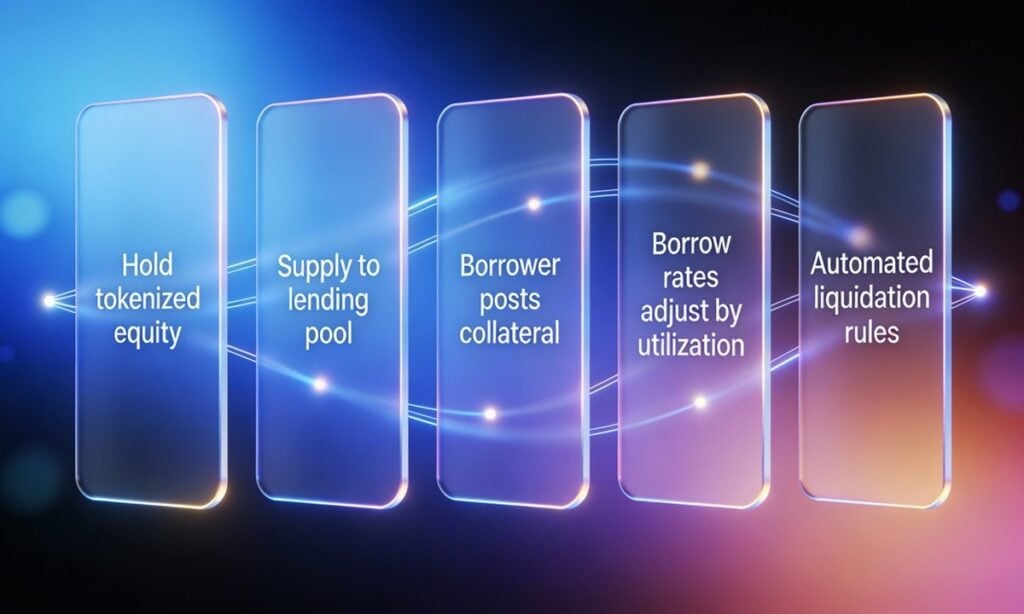
Securities lending, but on-chain: clear collateral rules, visible rates, and automated enforcement.
What To Watch
If you’re a retail investor tracking this space, here’s the practical checklist:
- Coinbase’s Dec. 17 details: what jurisdictions, what assets, what custody model, what partner (if any), and what timeline.
- Ondo’s Solana rollout specifics: which securities, who qualifies, how settlement and compliance are handled.
- Infrastructure maturity: whether lending/borrowing markets (like Edel’s) show transparent rates, clear risk parameters, and a credible audit posture before mainnet scale.
If your goal is “stocks, but more flexible,” the winners may not be the loudest brands. They may be the platforms that make tokenized equities behave like actual capital markets.
FAQs
How does Edel Finance compare to Ondo Finance and Coinbase tokenization?
Coinbase is primarily a distribution/access layer. Ondo focuses on issuing and expanding tokenized securities products across rails and ecosystems. Edel focuses on lending/borrowing/collateral infrastructure that makes tokenized equities financially usable beyond simple holding.
What is the best platform for stock diversification: Edel, Coinbase, or Ondo Finance?
They diversify different things. Coinbase can diversify access and venue choice. Ondo can diversify issuance rails and where tokenized securities live. Edel can diversify how you use holdings—earning yield or unlocking liquidity—if the lending markets mature with solid risk controls.
What is the most promising stock tokenization crypto coin?
There isn’t one universal answer, because “promising” depends on whether value accrues to (1) the venue, (2) the issuer, or (3) the infrastructure layer. A practical approach is to track which projects capture real activity: active users, assets supported, settlement reliability, and (for infrastructure) healthy utilization and transparent rates.
*This article was paid for. Cryptonomist did not write the article or test the platform.
You May Also Like

The Stunning ASEAN Winner Emerges As Manufacturing Shifts Accelerate

MySQL Single Leader Replication with Node.js and Docker
command: --server-id=1 --log-bin=ON The --server-id option gives each MySQL server in your replication setup its own name tag. Each one has to be unique and without it, replication won’t work at all. Another cool option not included here is binlog_format=ROW. This tells MySQL how to keep track of changes before passing them along to the replicas. By default, MySQL already uses row-based replication, but you can explicitly set it to ROW to be sure or switch it to STATEMENT if you’d rather log the actual SQL statements instead of row-by-row changes. \ Run our containers on docker Now, in the terminal, we can run the following command to spin up our database containers: docker-compose up -d \ Setting Up Our Master (Primary) Server To configure our master server, we would have to first access the running instance on docker using the following command docker exec -it mysql-master bash This command opens an interactive Bash shell inside the running Docker container named mysql-master, allowing us to run commands directly inside that container. \ Now that we’re inside the container, we can access the MySQL server and start running commands. type: mysql -uroot -p This will log you into MySQL as the root user. You’ll be prompted to enter the password you set in your docker-compose.yml file. \ Next, we need to create a special user that our replicas will use to connect to the master server and pull data. Inside the MySQL prompt, run the following commands: \ CREATE USER 'repl_user'@'%' IDENTIFIED BY 'replication_pass'; GRANT REPLICATION SLAVE ON . TO 'repl_user'@'%'; FLUSH PRIVILEGES; Here’s what’s happening: CREATE USER makes a new MySQL user called repl_user with the password replication_pass. GRANT REPLICATION SLAVE gives this user permission to act as a replication client. FLUSH PRIVILEGES tells MySQL to reload the user permissions so they take effect immediately. \ Time to Configure the Replica (Secondary) Servers a. First, let’s access the replica containers the same way we did with the master. Run this command in your terminal for each of the replica containers: \ docker exec -it <replica_container_name> bash mysql -uroot -p <replica_container_name> should be replace with the name of the replica container you are trying to setup b. Now it’s time to tell our replica where to get its data from. While inside the replica’s MySQL shell, run the following command to configure replication using the master’s details: CHANGE REPLICATION SOURCE TO SOURCE_HOST='mysql-master', SOURCE_USER='repl_user', SOURCE_PASSWORD='replication_pass', GET_SOURCE_PUBLIC_KEY=1; With the replication settings in place, let’s fire up the replica and get it syncing with the master. Still inside the MySQL shell on the replica, run: START REPLICA; This starts the replication process. To make sure everything is working, check the replica’s status with:
SHOW REPLICA STATUS\G; Look for Replica_IO_Running and Replica_SQL_Running — if both say Yes, congratulations! 🎉 Your replica is now successfully connected to the master and replicating data in real time.
Testing Our Replication Setup from the Node.js App Now that our replication is successfully set up, we can configure our Node.js server to observe the real-time effect of data being replicated from the master server to the replica server whenever we write to it. We start by installing the following dependencies:
npm i express mysql2 sequelize \ Now create a folder called src in the root directory and add the following files inside that folder connection.js, index.js and model.js. Our current directory should look like this We can now set up our connections to our master and replica server in the connection.js file as shown below
const Sequelize = require("sequelize"); const sequelize = new Sequelize({ dialect: "mysql", replication: { write: { host: "127.0.0.1", username: "root", password: "master", database: "replicaDb", }, read: [ { host: "127.0.0.1", username: "root", password: "slave", database: "replicaDb", port: 3307 }, { host: "127.0.0.1", username: "root", password: "slave", database: "replicaDb", port: 3308 }, { host: "127.0.0.1", username: "root", password: "slave", database: "replicaDb", port: 3309 }, ], }, }); async function connectdb() { try { await sequelize.authenticate(); } catch (error) { console.error("❌ unable to connect to the follower database", error); } } connectdb(); module.exports = { sequelize, }; \ We can now create a User table in the model.js file
const {DataTypes} = require("sequelize"); const { sequelize } = require("./connection"); const User = sequelize.define("User", { name: { type: DataTypes.STRING, allowNull: false, }, email: { type: DataTypes.STRING, unique: true, allowNull: false, }, }); module.exports = User \ and finally in our index.js file we can start our server and listen for connections on port 3000. from the code sample below, all inserts or updates will be routed by sequelize to the master server. while all read queries will be routed to the read replicas.
const express = require("express"); const { sequelize } = require("./connection"); const User = require("./model"); const app = express(); app.use(express.json()); async function main() { await sequelize.sync({ alter: true }); app.get("/", (req, res) => { res.status(200).json({ message: "first step to setting server up", }); }); app.post("/user", async (req, res) => { const { email, name } = req.body; let newUser = await User.build({ name, email, }); // This INSERT will go to the write (master) connection newUser = newUser.save({ returning: false }); res.status(201).json({ message: "User successfully created", }); }); app.get("/user", async (req, res) => { // This SELECT query will go to one of the read replicas const users = await User.findAll(); res.status(200).json(users); }); app.listen(3000, () => { console.log("server has connected"); }); } main(); When you make a POST request to the /users endpoint, take a moment to check both the master and replica servers to observe how data is replicated in real time. Right now, we are relying on Sequelize to automatically route requests, which works for development but isn’t robust enough for a production environment. In particular, if the master node goes down, Sequelize cannot automatically redirect requests to a newly elected leader. In the next part of this series, we’ll explore strategies to handle these challenges
